
Configuration: Allowed IDV Methods
🎯 Purpose
Defines which Identity Verification (IDV) methods are available during account recovery flows. These methods help verify user identity when they cannot access their normal authentication factors.
📍 Configuration Location
- Module: Auth Server
- Configuration Name:
allowed.idv.methods - Access Path:
Module Config Management → Auth Server → allowed.idv.methods
📊 Available IDV Methods Configuration
| IDV Method | Type | Default Value | Description |
|---|---|---|---|
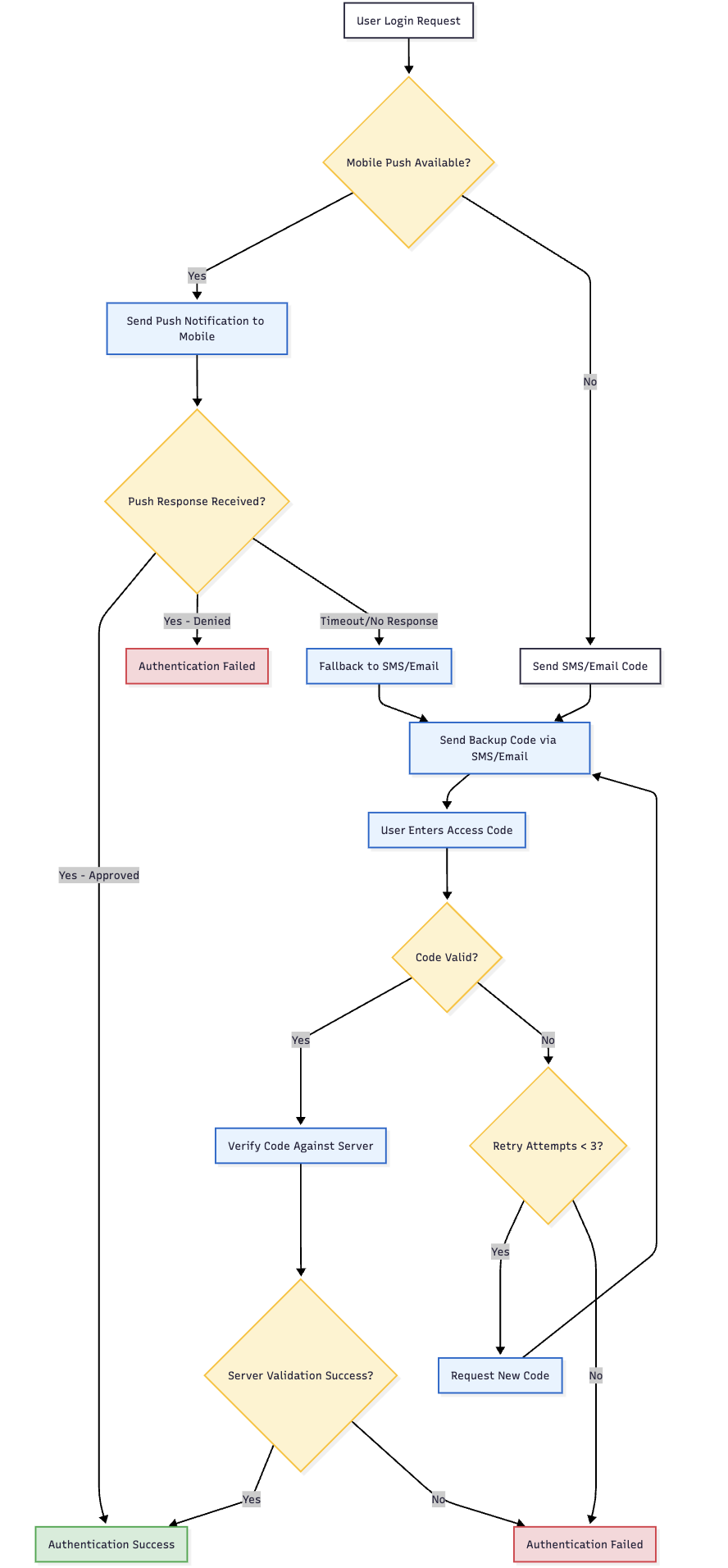
accessCodeValidation | boolean | true | OTP verification via email/SMS |
mobilePushVerification | boolean | true | Mobile app push notification verification |
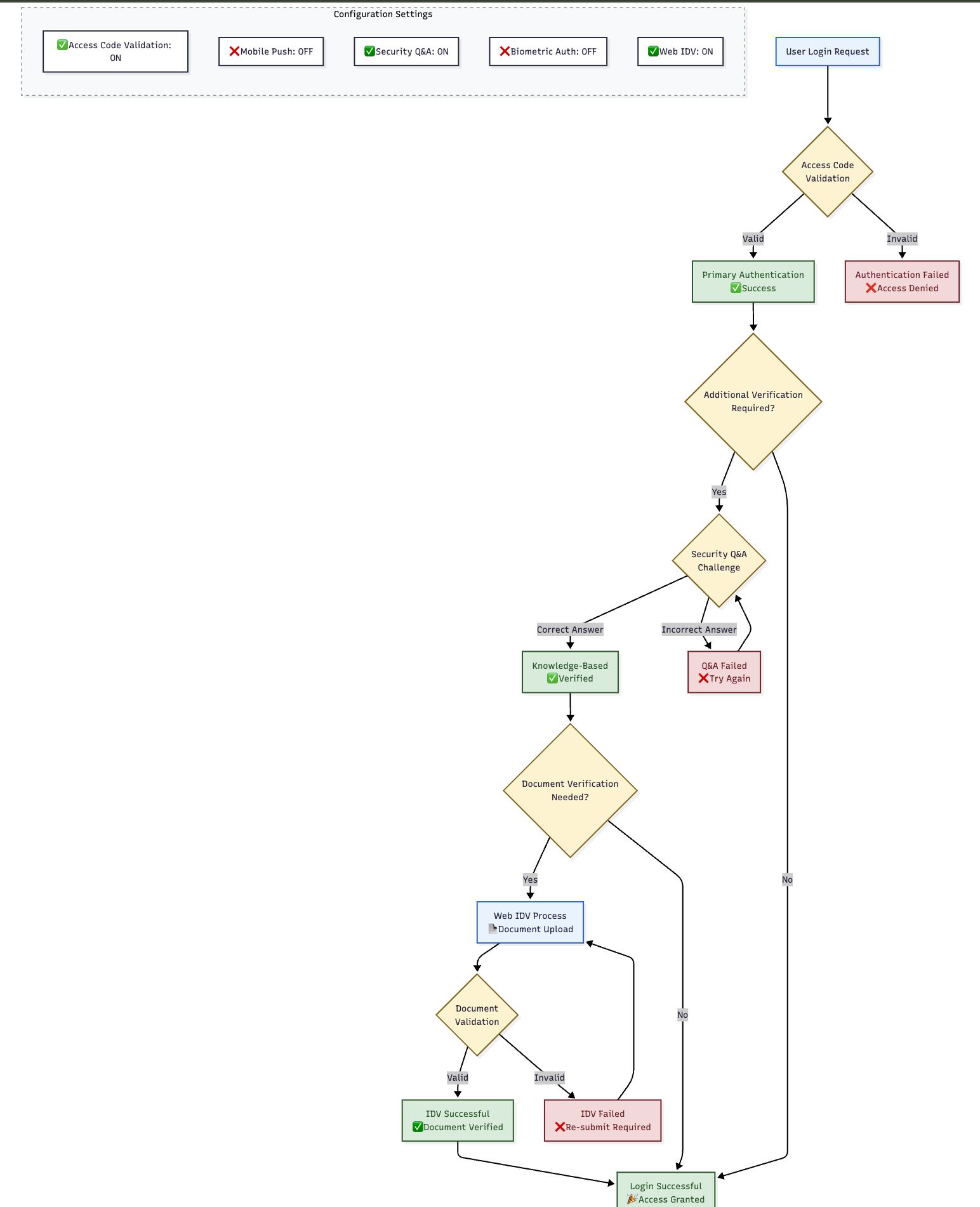
securityQA | boolean | true | Security questions and answers |
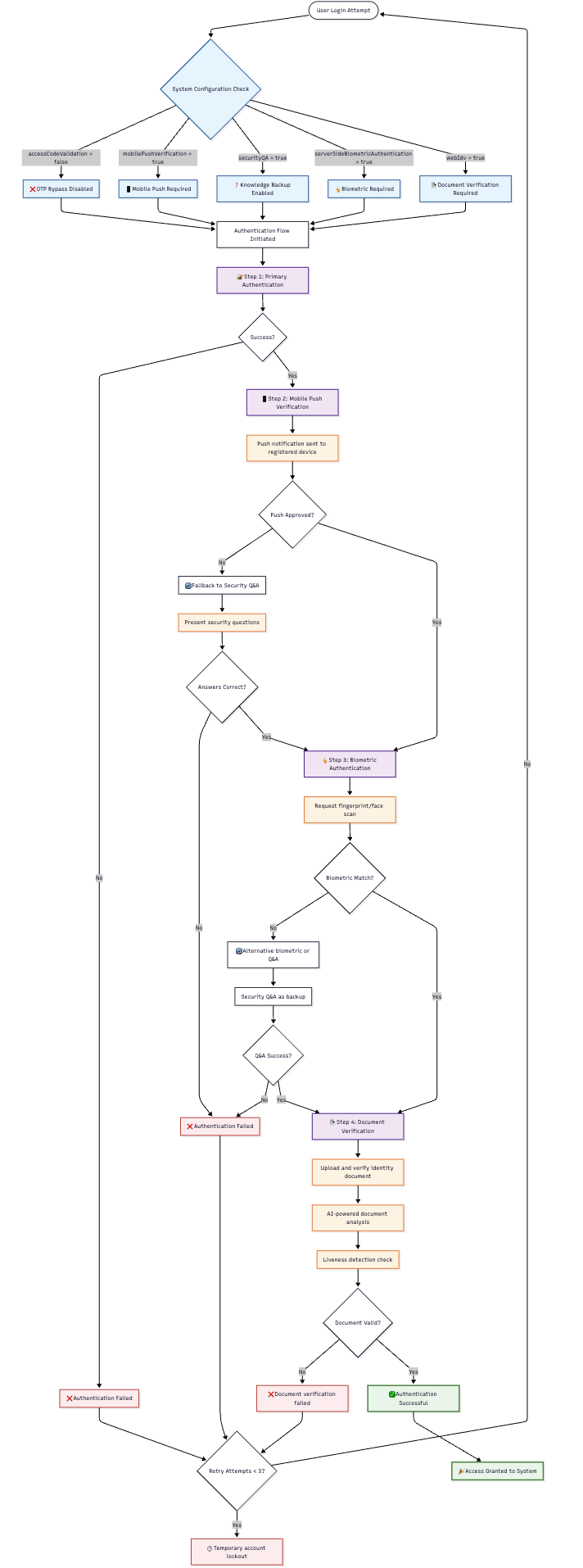
serverSideBiometricAuthentication | boolean | false | Server-stored biometric verification |
webIdv | boolean | false | Web-based identity verification flow |
🔧 IDV Method Details
📧 accessCodeValidation
- Function: Validates user identity through OTP codes sent to registered channels
- Channels: Email address or SMS (mobile number)
- Process: System sends code → User enters code → Identity verified
- Prerequisites: User must have registered email or mobile number
- Use Case: User cannot access mobile app but has email/SMS access
- Security Level: Medium (based on channel control)
Availability Conditions:
- ✅ Step 1 was skipped (user successfully did 1st factor authentication)
- ✅ Access code channel is available (email or SMS registered)
- ✅ Communication channel is functional
📱 mobilePushVerification
- Function: Verifies identity through Ditto ID mobile app push notification
- Process: System sends push → User approves on mobile → Identity verified
- Prerequisites: Active registered Ditto ID device
- Use Case: User forgot password but has mobile app access
- Security Level: High (device-based verification)
Availability Conditions:
- ✅ User has active registered Ditto ID device
- ✅ System requires password as 1st factor (
alwaysAskForPassword = true) - ✅ User failed password validation (didn't reach mobile-push-as-2nd-factor step)
❓ securityQA
- Function: Uses security questions and answers for identity verification
- Process: System presents questions → User provides answers → Responses validated
- Prerequisites: User must have set up security questions during registration
- Use Case: User cannot access mobile devices or communication channels
- Security Level: Medium (knowledge-based authentication)
Availability Conditions:
- ✅ User has successfully configured Security Questions & Answers
- ✅ Questions and answers are stored in user profile
- ✅ System has multiple questions available for verification
🤖 serverSideBiometricAuthentication
- Function: Authenticates using server-stored biometric templates
- Process: User provides biometric sample → Server compares against stored template
- Prerequisites: User must have biometric template stored on server
- Use Case: High-security environments with biometric enrollment
- Security Level: Very High (biometric verification)
Availability Conditions:
- ✅ User has server-side biometric template stored in profile
- ✅ Biometric verification system is operational
- ✅ User has device capable of biometric capture
🌐 webIdv
- Function: Full web-based identity verification using document verification
- Process: User provides identity documents → System verifies through KYC API
- Prerequisites: KYC API configured and operational
- Use Case: Complete identity re-verification for high-value accounts
- Security Level: Very High (document-based verification)
Availability Conditions:
- ✅ KYC API is properly configured
- ✅ Document comparison capability available
- ✅ User data on file for comparison
- ✅ Ditto ID IDV Web Server is operational
📋 IDV Method Selection Logic
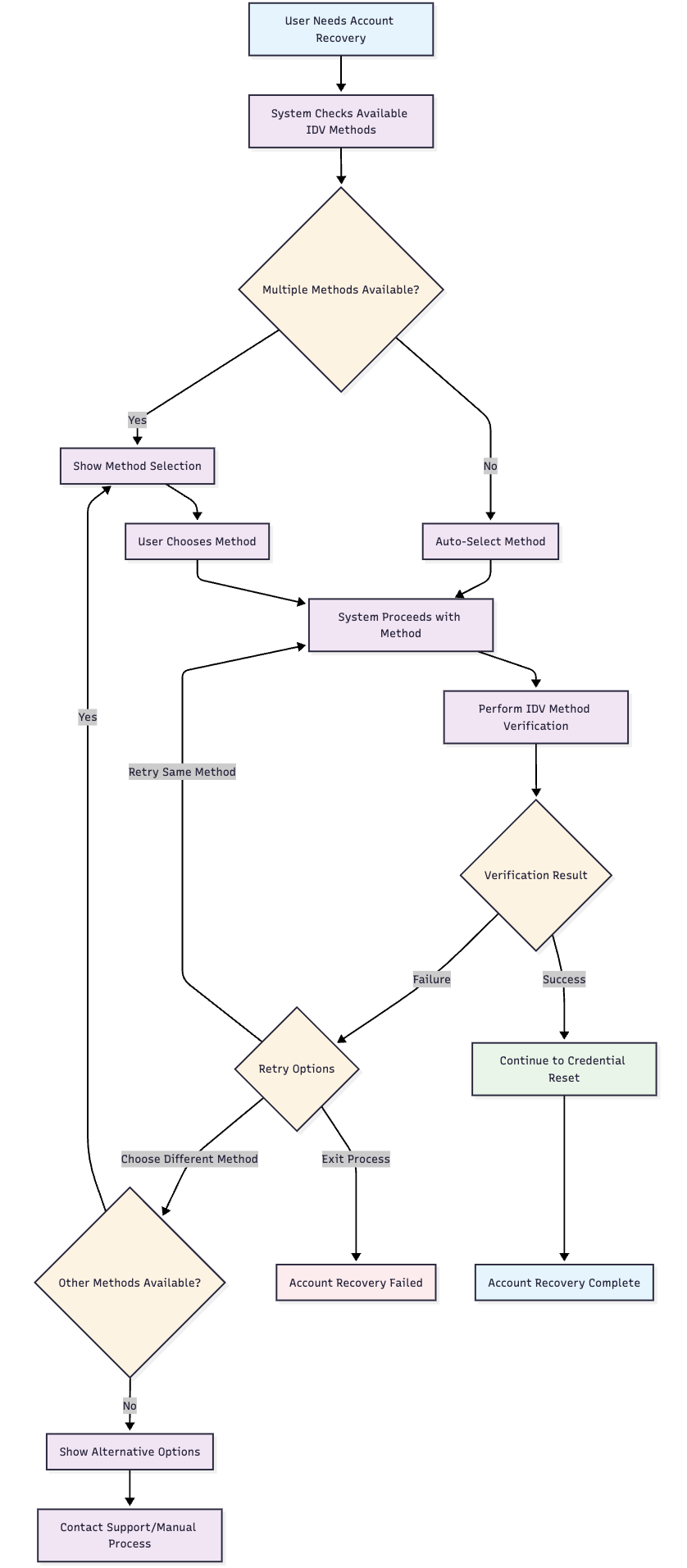
🤖 Automatic Selection Process
- Condition Check: System evaluates each enabled IDV method against user profile
- Available Methods: Creates list of methods where conditions are met
- Single Method: If only one method available, automatically selected
- Multiple Methods: User presented with choice of available methods
- No Methods: Error page displayed directing to customer support
👤 User Experience Flow
🎯 Configuration Scenarios
🔒 High Security Enterprise
📱 Mobile-Centric Setup
🌐 Web-Only Environment
⚠️ Configuration Considerations
🚨 Risk Assessment
| Scenario | Risk Level | Recommendation |
|---|---|---|
| All Methods Disabled | ⭐⭐⭐⭐⭐ Critical | Users cannot recover accounts |
| Single Method Only | ⭐⭐⭐⭐ High | Limited recovery options if method fails |
| Access Code Only | ⭐⭐⭐ Medium | Vulnerable to communication channel attacks |
| Multiple Methods | ⭐⭐ Low | Balanced security and usability |
🔧 Best Practices
- Enable Multiple Methods: Provide users with recovery alternatives
- Match Security Policies: Align IDV methods with organizational security requirements
- Test Prerequisites: Ensure supporting systems (KYC, biometric) are operational
- User Communication: Inform users about available recovery methods
- Regular Review: Periodically assess IDV method effectiveness and usage
🔗 Configuration Management Best Practices
📋 Configuration Change Process
- Planning: Assess impact of configuration changes on user experience
- Testing: Validate changes in non-production environment
- Communication: Notify users of changes that affect their authentication options
- Implementation: Apply changes during maintenance windows when possible
- Monitoring: Track authentication success rates after configuration changes
- Rollback Plan: Maintain ability to revert changes if issues arise
🛡️ Security Considerations
- Factor Diversity: Enable multiple authentication and IDV methods for resilience
- Risk Assessment: Balance security requirements with user experience
- Compliance: Ensure configurations meet regulatory and policy requirements
- Documentation: Maintain records of configuration changes and rationale
📊 Monitoring and Analytics
- Usage Metrics: Track which factors and IDV methods are most commonly used
- Success Rates: Monitor authentication and recovery success rates
- User Feedback: Collect input on authentication experience and difficulties
- System Performance: Ensure configuration choices don't impact system performance
🔗 Quick Reference
🎛️ Configuration Summary Table
| Configuration Area | Key Parameters | Primary Impact |
|---|---|---|
| Authentication Factors | rememberMe, smsOtp, emailOtp, alwaysAskForPassword | User login experience |
| Registration Factors | rememberMe, smsOtp, emailOtp, password, securityQA | User activation options |
| IDV Methods | accessCodeValidation, mobilePushVerification, securityQA, serverSideBiometricAuthentication, webIdv | Account recovery capabilities |
🛠️ Common Configuration Commands
- Access Path:
Gateway Management Console → Module Config Management → Auth Server - Apply Changes: Always click "Restart Services" after configuration updates
- Validation: Test authentication flows after making configuration changes
Updated 4 months ago