
OpenID Connect (OIDC) flow
🎯 Purpose
Provides step-by-step integration guide for connecting client/integrator/enterprise/Relying Party (RP) login pages with Ditto ID Web Authentication OpenID Connect flow.
Client/Integrator/Enterprise/RP Login Integration
🎯 Integration Process
Modify the RP's login page Sign/Log In button/link to redirect to Ditto ID Web Authentication Server's Authorization Endpoint with necessary parameters.
📋 Implementation Steps
- Identify Login Button: Locate existing Sign In / Log In button or link\
- Update URL: Change button/link URL to point to Ditto ID Authorization Endpoint
- Add Parameters: Include required OAuth2/OIDC parameters in URL
- Test Integration: Verify redirection works correctly
🌐 Authorization Endpoint
- URI Pattern:
https://<AUTH-SERVER-HNIP>:8006/relid/authserver/oauth/authorize\ - Method: GET request via browser redirect
- Parameters: Include client_id, response_type, scope, state, redirect_uri
📚 Reference Documentation
- Detailed Information: Ditto ID AuthServer Documentation\
- Section: Authorization Endpoint
- URI:
https://<AUTH-SERVER-HNIP>:8006/relid/authserver/oauth/authorize
Exchanging Authorization Code for Access Token
Exchanging Authorization code for access token follows the below steps:
🔄 Exchange Process Steps
📨 Receive Authorization Code
- User Redirect: User's browser redirected to registered redirect URI
- Authorization Code: Code included as URL parameter
- Target: RP server's endpoint (registered redirect URI)
🔍 Extract Authorization Code
- Server Processing: RP server reads Authorization Code from URL parameter
- Parameter Name: Typically 'code' parameter
- Validation: Verify code format and presence
** 🔄 Exchange Code for Token**
- API Call: RP server sends Authorization Code to Web Authentication server
- Endpoint: Access token endpoint
- Response: Receive Access Token (and optionally ID token)
** 🎯 Token Usage**
- User Identification: Use received tokens to identify user
- JWT Decoding: Access token is JWT - decode to get user information
- Claim Extraction: Extract user ID from "username" claim
📊 Token Information
🔓 JWT Claims Example
Example decoded access token JWT claims for user ID "testuser":
{
  "aud": [
    "OIDC"
  ],
  "username": "testuser",
  "scope": [
    "all",
    "openid"
  ],
  "exp": 1676635702,
  "authorities": [
    "ROLE_USER"
  ],
  "jti": "c71cf1ba-43d2-4baf-9b34-7750958c972a",
  "client_id": "Y2MwYzVkNWEtY2Q0YS00N2QxLThjNWQtNWFjZDRhYTdkMWQx"
}
👤 Alternative User Info Access
- User Info Endpoint: Alternative method to obtain user ID\
- Usage: Send access token to user info endpoint
- Response: User information in JSON format
🌐 API Endpoints
- Generate Access Token:
https://<AUTH-SERVER-HNIP>:8006/relid/authserver/oauth/token\ - User Info:
https://<AUTH-SERVER-HNIP>:8006/relid/authserver/oauth/userinfo
📚 Reference Documentation
- Detailed Information: Ditto ID AuthServer Documentation\
- Sections: Generate Access Token, User Info endpoints
🎯 Complete OIDC Integration Example
Comprehensive example showing Commercial Bank of Chatham's integration with Ditto ID AuthServer OIDC login flow.
🔄 Integration Steps
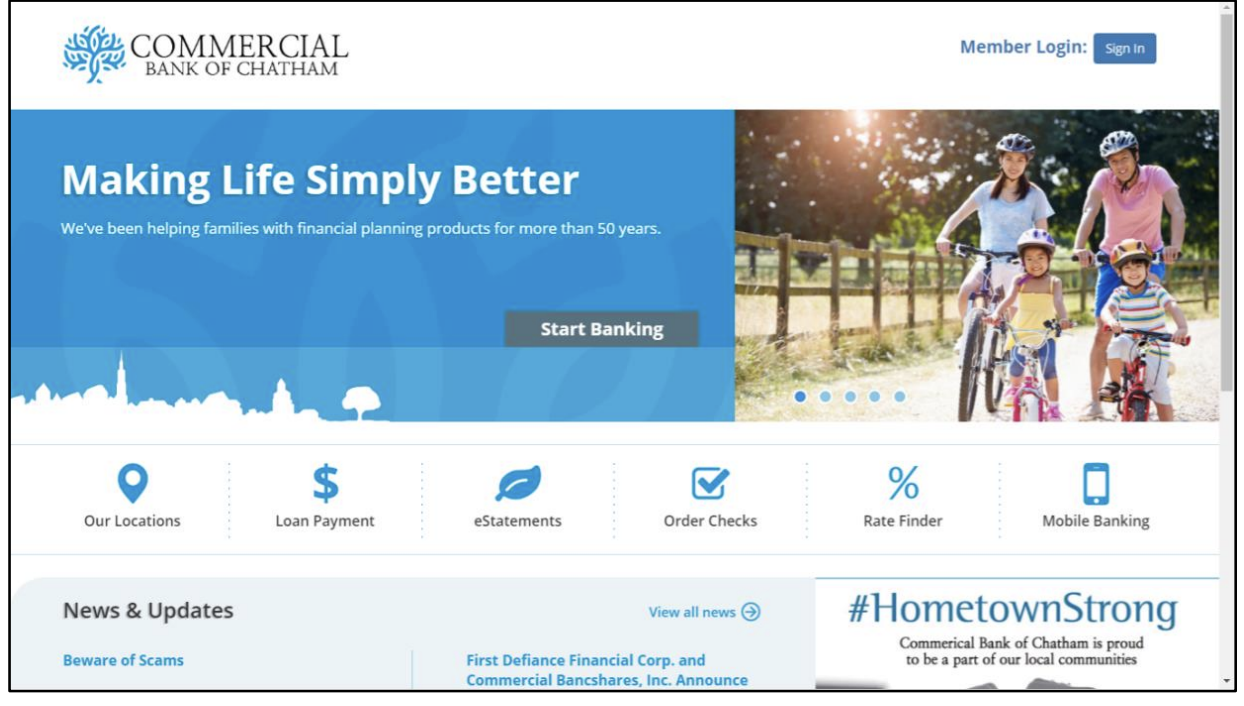
1. 🏪 Commercial Bank Setup
- Organization: Commercial Bank of Chatham\
- Integration: Sign In integrated with Ditto ID AuthServer OIDC login flow
- Objective: Replace existing login with Ditto ID authentication
2. 🔗 Login Button Integration
Original Button: Standard HTML login button
Updated Code: Modified to use Web Authentication server's Authorization endpoint
<a href="https://auth.relid.com:8006/relid/authserver/oauth/authorize?client_id=CHATHAM_BANK_CLIENT_ID&response_type=code&scope=all+openid&state=12345&redirect_uri=https://chathambank.uniken.com/callback">Sign In</a>3. 📨 Authorization Code Receipt
-
Callback URL:
https://chathambank.uniken.com/callback?code=JBwzTL&state=12345\ -
Components:
-
Base URL:
https://chathambank.uniken.com/callback(registered redirect URI) -
Authorization Code:
JBwzTL -
State Parameter:
12345(for CSRF protection)
4. 🔄 Token Exchange
- Process: Chatham Bank application exchanges authorization code
JBwzTL\ - Goal: Obtain access token using Access Token endpoint
- Method: Server-to-server API call
📋 URL Parameters Explained
| Parameter | Value | Purpose |
|---|---|---|
client_id | CHATHAM_BANK_CLIENT_ID | Identifies the client application |
response_type | code | Requests authorization code |
scope | all+openid | Requested permissions |
state | 12345 | CSRF protection parameter |
redirect_uri | https://chathambank.uniken.com/callback | Where to redirect after aut |
📚 Reference Documentation
- Token Exchange Details: Ditto ID AuthServer Documentation\
- Section: Generate Access Token (using Authorization Code)
- URI:
https://<AUTH-SERVER-HNIP>:8006/relid/authserver/oauth/token
Updated 4 months ago