
Update Mobile Number
🎯 Purpose
Enables users to change the mobile phone number used for receiving SMS authentication codes. This functionality ensures continuous access to SMS-based authentication when users change phone numbers or carriers.
📍 Access Requirements
- Edit Mode Active: Re-authentication must be completed
- SMS Factor Present: User must have SMS OTP authentication configured
- Update Button Available: SMS factor must show update capability in "Others" section
🔄 Mobile Number Update Process
🎯 Initiation
- Location: SMS authenticator in "Others" section with Auth Type: SMS
- Action Button: Click update/edit button (📝) for SMS authentication
- Availability: Button only functional after re-authentication
- User Context: Clear indication this affects SMS OTP delivery
🖥️ Update Mobile Number Screen
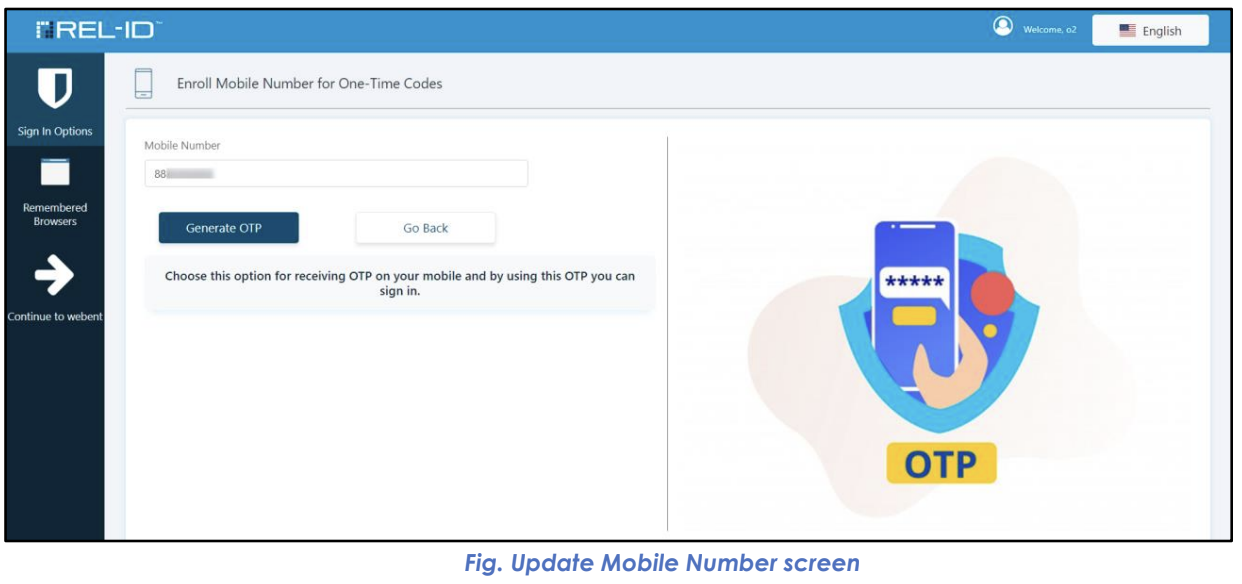
- Screen Title: "Update Mobile Number" prominently displayed
- Current Number: May show masked current mobile number
- New Number Field: Input field for new mobile phone number
- Format Guidance: Instructions for proper number format
- Generate OTP Button: Trigger for sending verification SMS
📊 Mobile Number Update Interface Elements
| Element | Purpose | User Experience |
|---|---|---|
| Current Number Display | Context | Shows masked current number (--1234) |
| New Number Input | Primary field | Mobile number format validation |
| Format Instructions | Guidance | Clear requirements for number format |
| Generate OTP Button | Verification trigger | Sends SMS to new number |
| OTP Input Field | Verification | Enter code received via SMS |
| Update Button | Action trigger | Processes number change |
🔐 Mobile Number Verification Process
📱 OTP Generation and SMS Delivery
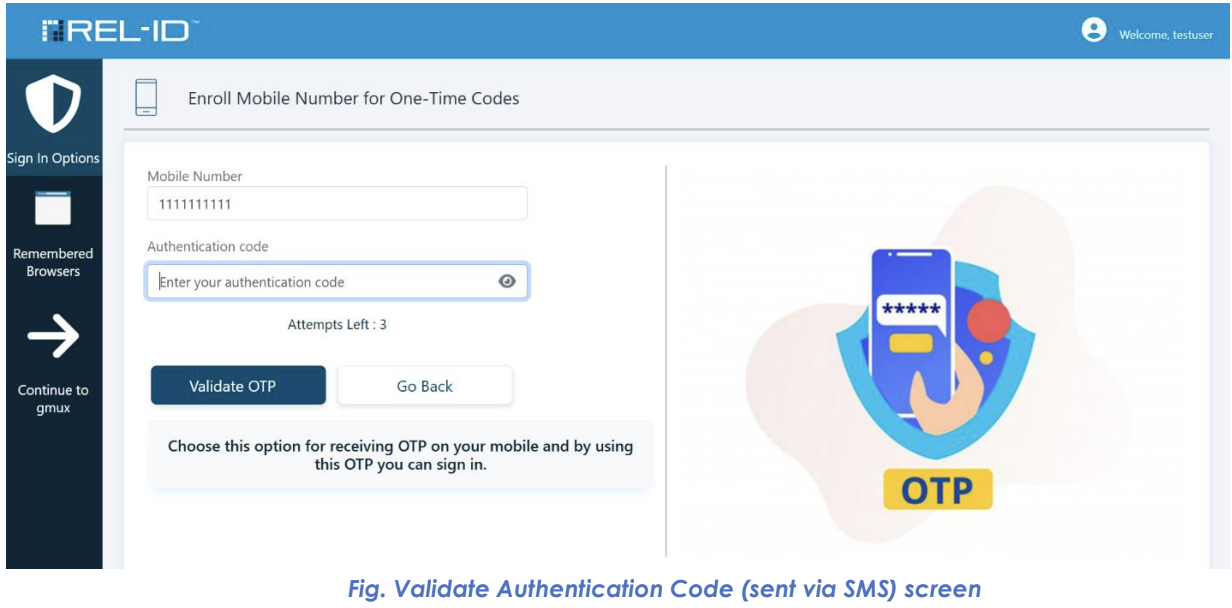
- Number Entry: User enters new mobile phone number
- Format Validation: System validates number format and carrier compatibility
- Generate OTP: User clicks "Generate OTP" button
- Code Creation: System generates 6-digit verification code
- SMS Dispatch: Authentication code sent via SMS to new number
- User Notification: Confirmation that SMS has been sent
📲 SMS Characteristics
- Sender: Ditto ID system SMS service
- Content: 6-digit verification code with clear identification
- Delivery: Usually delivered within seconds to minutes
- Expiration: Code valid for limited time (typically 5-10 minutes)
- Format: Clear, easy-to-read numeric code
🔄 Mobile Number Validation Flow
📝 Code Entry and Validation
- SMS Reception: User receives text message with 6-digit code
- Code Retrieval: User reads authentication code from SMS
- Code Entry: User enters code in "Validate Authentication Code (sent via SMS)" screen
- System Validation: Code verified against generated value
- Time Check: Validation ensures code used within expiration window
- Success Processing: Valid code triggers mobile number update
🎯 Validation Screen Elements
- Screen Title: "Validate Authentication Code (sent via SMS)"
- Instruction Text: Clear guidance about SMS code location
- Code Input Field: 6-digit numeric input field
- Resend Option: Link to request new SMS if needed
- Validate Button: Processes the entered code
✅ Success Flow
🎉 Successful Mobile Number Update
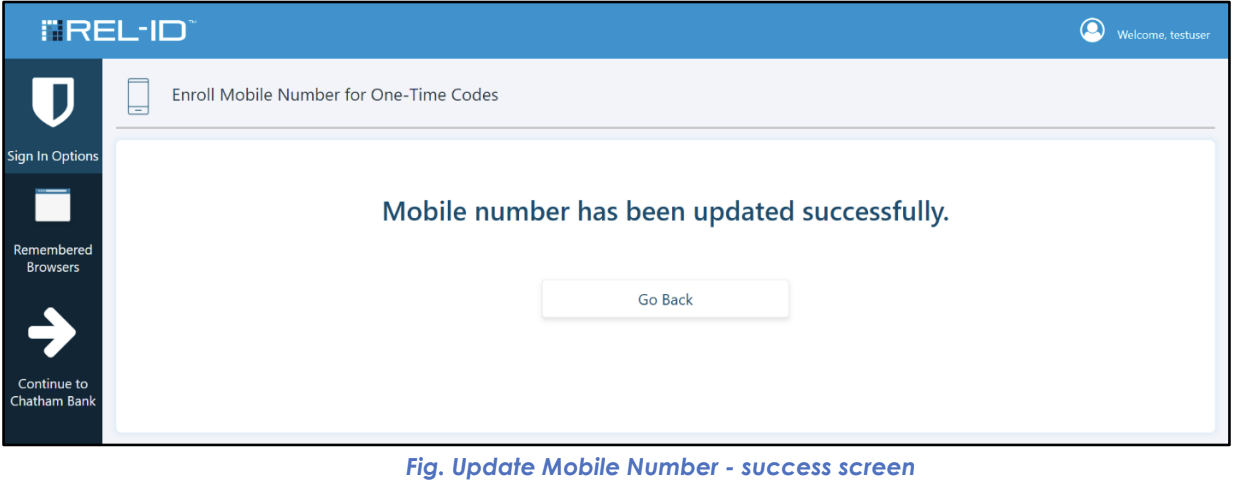
- Code Validation: Entered code matches and is within time limit
- Number Update: New mobile number replaces old number in system
- Success Screen: "Update Mobile Number - success screen" displayed
- Confirmation: Clear message that mobile number has been changed
- Immediate Effect: New number active for future SMS OTP delivery
📱 Success Screen Features
- Success Icon: Visual confirmation of successful change
- Success Message: "Your mobile number has been successfully updated"
- New Number Display: Confirmation of updated mobile number (may be masked)
- Return Option: Link back to Sign In Options screen
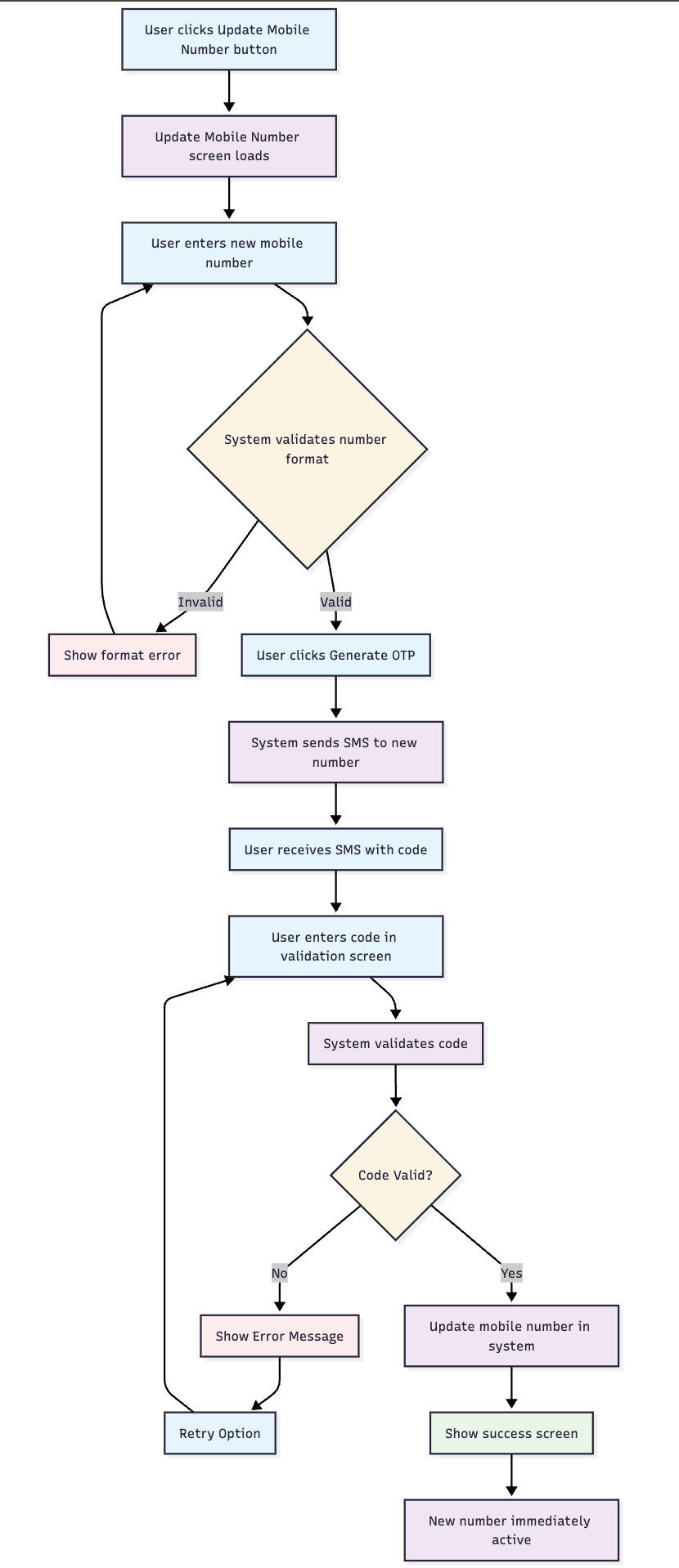
🔄 Mobile Number Update Flow Diagram
🚨 Error Handling and Recovery
❌ Common Error Scenarios
| Error Type | Cause | User Experience | Resolution |
|---|---|---|---|
| Invalid Number Format | Malformed phone number | Format error message | Correct number format |
| SMS Not Received | Carrier issues, poor signal | No SMS received | Use resend functionality |
| Invalid Code | Wrong digits entered | "Invalid code" error | Re-enter correct code |
| Expired Code | Code used too late | "Code expired" error | Generate new code |
| Carrier Blocking | SMS service blocked | Delivery failure | Contact carrier or try different number |
🔄 Recovery Options
- Resend SMS: New verification code sent to same number
- Number Correction: User can modify number and retry
- Format Help: Guidance on proper number formatting
- Carrier Support: Information about SMS delivery issues
📱 Mobile Number Format Requirements
🌍 International Support
- Country Codes: Support for international number formats
- Carrier Compatibility: Works with major mobile carriers
- Format Validation: Real-time validation of number format
- Regional Support: Adaptation to local numbering conventions
📊 Format Guidelines
| Element | Requirement | Example |
|---|---|---|
| Country Code | May be required | +1 for USA |
| Area Code | Usually required | (555) or 555 |
| Number Length | Carrier-specific | 10 digits for USA |
| Special Characters | Usually ignored | Dashes, spaces, parentheses |
🎯 User Experience Considerations
📲 SMS Delivery Guidance
- Delivery Time: Expected SMS arrival time (usually under 1 minute)
- Signal Strength: Importance of good cellular reception
- Carrier Delays: Possible delays during high-traffic periods
- International: Additional considerations for international numbers
🔒 Security Features
- Number Verification: Ensures user controls the new mobile number
- Time-Limited Codes: Prevents code reuse and reduces security risk
- Single-Use Codes: Each code can only be used once successfully
- Carrier Security: Leverages carrier-level SMS security
⚠️ Important Considerations
🔄 Immediate Effect
- Instant Activation: New mobile number immediately active
- SMS Delivery: Future authentication codes sent to new number
- Old Number: Previous number no longer receives authentication SMS
- No Delay: Change takes effect immediately upon validation
🛡️ Security Implications
- Access Control: User must control both current session and new mobile device
- Verification Required: Prevents unauthorized number changes
- Audit Trail: Mobile number changes logged for security monitoring
- Recovery Impact: Changes may affect account recovery processes
- Cross-Platform: Number change affects all systems using SMS authentication
Updated 4 months ago